This blog is designed to show various ways to use Data Virtualization, technologies, and SAS with Microsoft technologies with an eye toward outside of the box thinking.
Sunday, April 22, 2012
SAS & Excel Via Local Provider
A question came up on SAS-L for how to get Excel to read SAS datasets using the Data Sources within Excel. Here are some screenshots showing how it works:
Wednesday, April 18, 2012
Hash a SAS Value
Sometimes, it is good to be able to hash a value so that a unique key can be made into the data. For example, say you were looking at a system performance log. You have a PID, a process name, and a user. PIDs are reused by a system all of the time so trying to narrow down uniqueness throughout a day is hard.
It order to get a unique value, you could concatenate the values into one:
000789654 || WeeklyProcess || gertre5
We are assuming that there is no need to ever reverse the values. This is a key assumption.
There is an undocumented function in SAS called CRCXX1 that can create a unqiue hash. Here is some code illustrating it:
The results:
This could be very valuable for situations where you need to tighten up processing and have some throwaway field values. The person who mentioned the undocumented function says it is good to about 1 million unique values before it starts to have collisions. Above that, go with the MD5 function.
It order to get a unique value, you could concatenate the values into one:
000789654 || WeeklyProcess || gertre5
We are assuming that there is no need to ever reverse the values. This is a key assumption.
There is an undocumented function in SAS called CRCXX1 that can create a unqiue hash. Here is some code illustrating it:
data A; input name :$200. gender :$8. state :$20.; x = compress(name||gender||state); y = CRCXX1(x); put x= y=32. ; datalines; Churchill,Alan Male Colorado Churchill,John Male Colorado ; run;
The results:
data A;
884 data A;
885 input name :$200. gender :$8. state :$20.;
886 x = compress(name||gender||state);
887 y = CRCXX1(x);
888 put x= y=32. ;
889 datalines;
x=Churchill,AlanMaleColorado y=1558070123
x=Churchill,JohnMaleColorado y=837584169
NOTE: The data set WORK.A has 2 observations and 5 variables.
NOTE: DATA statement used (Total process time):
real time 0.00 seconds
cpu time 0.00 seconds
892 ;
893 run;
This could be very valuable for situations where you need to tighten up processing and have some throwaway field values. The person who mentioned the undocumented function says it is good to about 1 million unique values before it starts to have collisions. Above that, go with the MD5 function.
Saturday, March 10, 2012
SAS and LDAP
I was just tasked to read in LDAP records so we could cross-reference userids with login identifiers and general ledger information.
Using SAS to read LDAP was a bit of a challenge. I had used C# to read LDAP before and had been successful at several engagements. However, I had never journeyed into SAS land on the LDAP front. The information on how to do it is sparse. More than that, LDAP is very, very sensitive to wrong information and the response when rnning the code is simply 'LDAP Failed'.
LDAP provides a tremendous datasource for SAS developers.
Let me show you how to work with it:
1. Download and install LDAP browser by Softerra. It is crucial to help navigate the LDAP waters.
2. Pick a simple LDAP server to start with. I will use Colorado State University. Lots of colleges have public LDAPs so they are perfect. For our example, we are going to find details on the faculty of the history dept (my undergrad was history).
Here are the specifics:
The SAS code is broken into 6 main pieces:
1. Connect to the server
2. Find the person we need
3. Parse the information
4. End the connection
5. Close the connection
6. Convert the XML into a dataset
Code:
Some notes on the above code:
1. The XML libname engine is used to do a conversion from vertical format (LDAP data is vertical) to a dataset layout. Since SAS handles this automagically with XML, why not use it instead of fancy data step.
2. Anyone can run the above code. The CSU LDAP server is in the public so why not.
3. Use LDAP Broser to determine the DNBase and other pertinent information needed. The tool is free and helps get the names and order correct.
[UPDATE: For authenticated servers, you need to bind the user name. For example:
server="directory.colostate.edu";
port=389;
base=" ou=History (1776), ou=Faculty/Staff, dc=colostate, dc=edu";
bindDN="CN=achurchill,CN=Users,DC=MyDomain,DC=savian,DC=net";
Pw="your password";
]
Using SAS to read LDAP was a bit of a challenge. I had used C# to read LDAP before and had been successful at several engagements. However, I had never journeyed into SAS land on the LDAP front. The information on how to do it is sparse. More than that, LDAP is very, very sensitive to wrong information and the response when rnning the code is simply 'LDAP Failed'.
LDAP provides a tremendous datasource for SAS developers.
Let me show you how to work with it:
1. Download and install LDAP browser by Softerra. It is crucial to help navigate the LDAP waters.
2. Pick a simple LDAP server to start with. I will use Colorado State University. Lots of colleges have public LDAPs so they are perfect. For our example, we are going to find details on the faculty of the history dept (my undergrad was history).
Here are the specifics:
| LDAP server: | directory.colostate.edu |
| Port: | 389 |
| DNBase: | ou=History (1776), ou=Faculty/Staff, dc=colostate, dc=edu |
The SAS code is broken into 6 main pieces:
1. Connect to the server
2. Find the person we need
3. Parse the information
4. End the connection
5. Close the connection
6. Convert the XML into a dataset
Code:
filename outxml 'c:\temp\LDAP.xml';
libname outxml xml 'c:\temp\LDAP.xml';
data _null_;
file outxml;
length entryname $200 Attribute $100 Value $100 filter $100;
rc =0; handle=0;
server="directory.colostate.edu";
port=389;
/* Make sure these are in order */
base=" ou=History (1776), ou=Faculty/Staff, dc=colostate, dc=edu";
bindDN=""; Pw="";
/* open connection to LDAP server */
call ldaps_open(handle, server, port, base, bindDn, Pw, rc);
if rc ne 0 then do;
msg = sysmsg();
putlog msg;
end;
else
putlog "LDAPS_OPEN call successful.";
shandle=0;
num=0;
filter="(objectClass=*)";
attrs=" ";
/* search the LDAP directory */
call ldaps_search(handle,shandle,filter, attrs, num, rc);
if rc ne 0 then do;
msg = sysmsg();
putlog msg;
end;
else
putlog "LDAPS_SEARCH call successful. Num entries: " num;
* Start the XML;
put '<?xml version="1.0" encoding="windows-1252" ?>'
/@3 '<TABLE>'
;
do eIndex = 1 to num;
numAttrs=0;
entryname='';
/* retrieve each entry name and number of attributes */
call ldaps_entry(shandle, eIndex, entryname, numAttrs, rc);
if rc ne 0 then do;
msg = sysmsg();
putlog msg;
end;
/* for each attribute, retrieve name and values */
put @6 '<LDAP>' ;
do aIndex = 1 to numAttrs;
Attribute='';
numValues=0;
call ldaps_attrName(shandle, eIndex, aIndex, Attribute, numValues, rc);
if rc ne 0 then
do;
msg = sysmsg();
putlog msg;
end;
do vIndex = 1 to numValues;
call ldaps_attrValue(shandle, eIndex, aIndex, vIndex, value, rc);
if rc ne 0 then
do;
msg = sysmsg();
putlog msg;
end;
else
do;
*if vIndex > 1; *This is done to keep duplicates out of XML;
put @9 '<' Attribute +(-1) '>' Value +(-1) '</' Attribute +(-1) '>' ;
end;
end;
end;
put @6 '</LDAP>' ;
end;
put @3 '</TABLE>';
/* free search resources */
call ldaps_free(shandle,rc);
if rc ne 0 then
do;
msg = sysmsg();
putlog msg;
end;
else
putlog "LDAPS_FREE call successful.";
/* close connection to LDAP server */
call ldaps_close(handle,rc);
if rc ne 0 then
do;
msg = sysmsg();
putlog msg;
end;
else
putlog "LDAPS_CLOSE call successful.";
run;
data test;
set outxml.LDAP;
run;
Some notes on the above code:
1. The XML libname engine is used to do a conversion from vertical format (LDAP data is vertical) to a dataset layout. Since SAS handles this automagically with XML, why not use it instead of fancy data step.
2. Anyone can run the above code. The CSU LDAP server is in the public so why not.
3. Use LDAP Broser to determine the DNBase and other pertinent information needed. The tool is free and helps get the names and order correct.
[UPDATE: For authenticated servers, you need to bind the user name. For example:
server="directory.colostate.edu";
port=389;
base=" ou=History (1776), ou=Faculty/Staff, dc=colostate, dc=edu";
bindDN="CN=achurchill,CN=Users,DC=MyDomain,DC=savian,DC=net";
Pw="your password";
]
Tuesday, March 06, 2012
SAS/IntrNet and IIS 7.5
First of all, I had to set up SAS/IntrNet recently. I do this at times and always struggle with security
issues in IIS. Hence, I document it below.
People may ask why use SAS/IntrNet anymore? Well, it is fast and is probably the fastest way to interact with SAS via the web. It has limitations but it implements a standard REST api that is used by loads of web companies (i.e. Twitter, Facebook, etc.). I absolutely love IntrNet due to its simplicity.
Let's make it happen:
===============================================
I posted a short while back on how to get SAS/IntrNet operational on IIS 7. Well, I had to do everything again under IIS 7.5 and eiteher things have changed slightly or I didn't get it all captured last time. So here we go again, but this time with pictures:
1. Open up IIS in Windows Server 2008 R2 and right-click on sites, Add a new site:
3. Pay attention to the application pool and any host header information. Host headers are nice for handling lots of different sites under a single domain name.
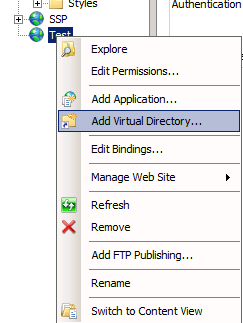
4. You should now have a basic site. Add in a virtual directory for the scripts directory:
5. Point it to the SAS/IntrNet scripts location (normally c:\inetpub\scripts).
7. Go to Windows Explorer, go to the scripts directory, right-click and select properties. Go to the security tab and add in the app pool identity. This is different than previous versions of IIS. If you used DefaultAppPool as shown above, use the following id:
IIS AppPool\DefaultAppPool
[Note: Even a single space at the end of the above name will cause it to not work.]
8. Go back to IIS, click on the site, select Handler Mappings, Add Managed Handler:
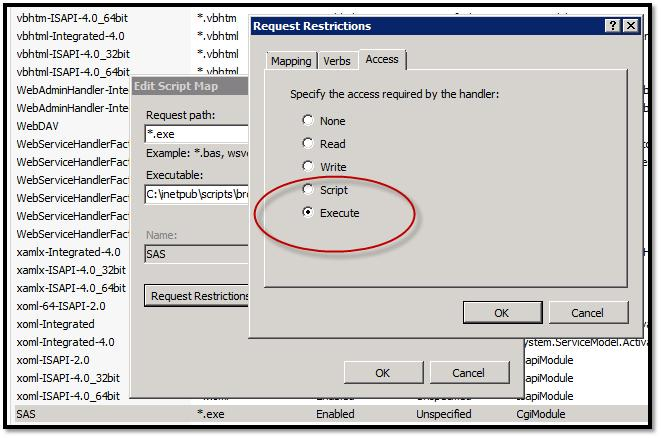
9. CRITICAL STEP. While inside of Handler Mappings, click on request restrictions, go to the Access tab, and select Execute:
10. Finally, go to the Authentication tab for your site and open it. Under Anonymous Authentication, select edit and change it to the pool identity:
If all of the above does not work, call or email.
issues in IIS. Hence, I document it below.
People may ask why use SAS/IntrNet anymore? Well, it is fast and is probably the fastest way to interact with SAS via the web. It has limitations but it implements a standard REST api that is used by loads of web companies (i.e. Twitter, Facebook, etc.). I absolutely love IntrNet due to its simplicity.
Let's make it happen:
===============================================
I posted a short while back on how to get SAS/IntrNet operational on IIS 7. Well, I had to do everything again under IIS 7.5 and eiteher things have changed slightly or I didn't get it all captured last time. So here we go again, but this time with pictures:
1. Open up IIS in Windows Server 2008 R2 and right-click on sites, Add a new site:
2. Fill in the details:
3. Pay attention to the application pool and any host header information. Host headers are nice for handling lots of different sites under a single domain name.
4. You should now have a basic site. Add in a virtual directory for the scripts directory:
5. Point it to the SAS/IntrNet scripts location (normally c:\inetpub\scripts).
6. Make sure that CGI is enabled on your IIS installation. if not, go to the server roles and enable it. if it is enabled, you should see it in the site information:
If you need to add CGI, follow these steps (from: http://www.computerperformance.co.uk/Longhorn/server_2008_uac_user_account_control.htm)
7. Go to Windows Explorer, go to the scripts directory, right-click and select properties. Go to the security tab and add in the app pool identity. This is different than previous versions of IIS. If you used DefaultAppPool as shown above, use the following id:
IIS AppPool\DefaultAppPool
[Note: Even a single space at the end of the above name will cause it to not work.]
8. Go back to IIS, click on the site, select Handler Mappings, Add Managed Handler:
9. CRITICAL STEP. While inside of Handler Mappings, click on request restrictions, go to the Access tab, and select Execute:
10. Finally, go to the Authentication tab for your site and open it. Under Anonymous Authentication, select edit and change it to the pool identity:
If all of the above does not work, call or email.
Tuesday, December 27, 2011
SAS Macro to Make Tiny URLs
Someone on SAS-L wanted a piece of SAS code to convert a long url to a short one. Well, here you go:
filename in "x:\temp\in";
filename out "x:\temp\out.txt";
%macro MakeTiny(longUrl=);
data _null_;
file in lrecl=1028;
put "url=&longUrl" ;
run;
proc http in=in out=out url="http://tinyurl.com/api-create.php"
method="post"
ct="application/x-www-form-urlencoded";
run;
data _null_ ;
infile out;
input tinyUrl :$1024. ;
call symput('tinyUrl',tinyUrl);
%global tinyUrl ;
run;
%mend makeTiny;
%MakeTiny(longUrl=www.savian.net);
%put &tinyUrl ;
Thursday, July 21, 2011
WCF and PROC SOAP
Adam Bullock in SAS Tech Support has become a superstar in my book. I don't send him tickets directly but the area I am working in always seems to find him.
The latest issue was consuming a WCF service. This was different since Microsoft uses interfaces in WCF vs the old way of doing it. I didn't catch that but Adam did. Here is working SAS code for handling it:
Adam used SoapUI to track it down and was nice enough to send a picture of where he saw the interface call:

The latest issue was consuming a WCF service. This was different since Microsoft uses interfaces in WCF vs the old way of doing it. I didn't catch that but Adam did. Here is working SAS code for handling it:
FILENAME REQUEST 'C:\temp\REQUEST.xml';
FILENAME RESPONSE 'C:\temp\RESPONSE.xml';
data _null_;
file request;
input;
put _infile_;
datalines4;
<soapenv:Envelope xmlns:soapenv="http://schemas.xmlsoap.org/soap/envelope/" xmlns:tem="http://tempuri.org/">
<soapenv:Header/>
<soapenv:Body>
<tem:DoWork>
<!--Optional:-->
<tem:p>Test</tem:p>
</tem:DoWork>
</soapenv:Body>
</soapenv:Envelope>
;;;;
run;
%let RESPONSE=RESPONSE;
proc soap in=REQUEST
out=&RESPONSE
url="http://prognos2.savian.net/SampleServices/cdmAlive.svc"
soapaction="http://tempuri.org/ICdmAlive/DoWork"
;
run;
Adam used SoapUI to track it down and was nice enough to send a picture of where he saw the interface call:
Monday, June 20, 2011
Wix and InStyler
This isn't a SAS post even though SAS is on the periphery of this one. This post is designed to help other developers in a similar boat if they get a hit on the error message verbiage.
The standard MS Installer is going away (next year, I believe), and a lot of people are converting to WIX (Windows Installer XML). On my latest project, I needed a custom installer. Now anyone who has ever worked with custom installers should be able to tell you what an absolute pain it is, how hard it is to debug, hard to put in custom screens, etc.
This seemed like an opportune time to jump over to WIX, especially when I needed a lot more than what the custom dialogs could provide under the standard Windows installer technology inside of Visual Studios. InstallShield was NOT an option. They want way, way too much money for their product and I am not a fan from days of yore.
WIX is very flexible but it is also hard to work with. There are no GUIs, per se, for it which means a lot of manual coding. My current WIX file, code generated, is weighing in at 900+ lines of XML. That and looking up the GUIDs for products, etc. meant a lot of manual effort and lots of places for mistakes.
I found a product on the web called Instyler Setup. Not sure how well supported it is, and it has a number of bugs, but it mostly writes the WIX for you. Two of the most annoying bugs I wanted to describe so others can seee them on the web:
1. "Error 2834: The next pointers on the dialog ErrorPopup do not form a single loop"
...when running the installer is caused by the text label on the ErrorPopup dialog having a tabstop set to true. MSI is very, very picky about everything which is why it is a nightmare to debug.
2. "Error 1723. There is a problem with this Windows Installer package."
...make sure you reference the CA dll instead of teh normal dll on your custom action.
3. To make working with WIX a lot easier, download and install the DTF package:
http://wix.sourceforge.net/
4. Turn on MSI debugging in your local group policy. this makes like a lot easier to track things down.
I hope these get picked up in the search engines and helps some other dev out at some point.
The standard MS Installer is going away (next year, I believe), and a lot of people are converting to WIX (Windows Installer XML). On my latest project, I needed a custom installer. Now anyone who has ever worked with custom installers should be able to tell you what an absolute pain it is, how hard it is to debug, hard to put in custom screens, etc.
This seemed like an opportune time to jump over to WIX, especially when I needed a lot more than what the custom dialogs could provide under the standard Windows installer technology inside of Visual Studios. InstallShield was NOT an option. They want way, way too much money for their product and I am not a fan from days of yore.
WIX is very flexible but it is also hard to work with. There are no GUIs, per se, for it which means a lot of manual coding. My current WIX file, code generated, is weighing in at 900+ lines of XML. That and looking up the GUIDs for products, etc. meant a lot of manual effort and lots of places for mistakes.
I found a product on the web called Instyler Setup. Not sure how well supported it is, and it has a number of bugs, but it mostly writes the WIX for you. Two of the most annoying bugs I wanted to describe so others can seee them on the web:
1. "Error 2834: The next pointers on the dialog ErrorPopup do not form a single loop"
...when running the installer is caused by the text label on the ErrorPopup dialog having a tabstop set to true. MSI is very, very picky about everything which is why it is a nightmare to debug.
2. "Error 1723. There is a problem with this Windows Installer package."
...make sure you reference the CA dll instead of teh normal dll on your custom action.
3. To make working with WIX a lot easier, download and install the DTF package:
http://wix.sourceforge.net/
4. Turn on MSI debugging in your local group policy. this makes like a lot easier to track things down.
I hope these get picked up in the search engines and helps some other dev out at some point.
Subscribe to:
Posts (Atom)
SAS throwing RPC error
If you are doing code in C# and get this error when creating a LanguageService: The RPC server is unavailable. (Exception from HRESULT:...
-
I am finally ready with my SAS dataset reader/writer for .NET. It is written in 100% managed code using .NET 3.5. The dlls can be found here...
-
Well, around 14 months ago, I started on a journey to understand the SAS dataset so I could read and write one independently. Originally, I ...
-
I've recently posted code samples of using VSTO and some other means of getting SAS data into Excel. I thought I would compile a list of...